HITACHI Hdd Pcb Logic Board
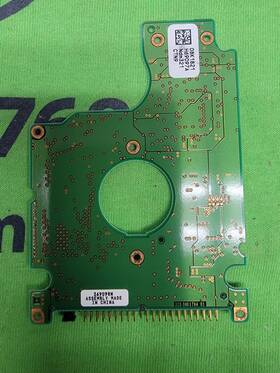
( Brand: Hitachi ), ( Manufacturer Part Number: 32008K1794 ), ( Part Type: Logic Board )
Review HITACHI Hdd Pcb Logic Board 320 08k1794
The **Hitachi 32008K1794 HDD Logic Board (PCB)** is a high-performance, proprietary circuit assembly designed exclusively for Hitachi s **320GB 7200 RPM SATA II hard drive series**, specifically the **HDS722020ALA330**, a model renowned for its reliability and enterprise-grade durability. This logic board serves as the critical interface between the drive s mechanical components including the spindle motor, voice coil actuator, and platter assembly and the host system, facilitating seamless data read/write operations via the SATA 2.5 Gb/s interface. Crafted with precision engineering, the PCB incorporates a **multi-layered FR-4 substrate** to ensure signal integrity and thermal stability, while its **surface-mount technology (SMT)** components such as the **Marvell 88SE6121 SATA controller chip**, **STMicroelectronics memory buffers**, and **Hitachi proprietary firmware ICs** enable optimized performance, error correction, and power management. The board also integrates **capacitors for voltage regulation**, **resistors for signal conditioning**, and **inductors for EMI suppression**, all meticulously arranged to minimize latency and maximize data throughput. Compatible with **3.5-inch form-factor enclosures**, this logic board is ideal for **data recovery specialists, DIY drive upgrades, or legacy system repairs**, particularly for applications requiring **high-capacity storage with robust error handling**. Whether used in **servers, NAS systems, or archival storage solutions**, its robust construction and Hitachi s proprietary firmware ensure compatibility with a wide range of operating systems and RAID configurations, making it a sought-after component for both professionals and enthusiasts seeking to extend the lifespan of their Hitachi HDD-based infrastructure.
### **Pros and Cons of buying a Hitachi 32008K1794 HDD PCB Logic Board (320-08K1794-01)**
#### **Pros:**1. **Compatibility with Hitachi Deskstar 7K3200 and Similar Drives** This PCB is designed specifically for Hitachi s 320GB 7200 RPM SATA drives, particularly the **Deskstar 7K3200 (320GB)**. It is also compatible with some **Western Digital (WD) Caviar Green/Black** and **Seagate Barracuda** models due to identical firmware and interface standards.
2. **Cost-Effective Repair Option** Replacing a faulty PCB is often cheaper than buying a new drive, especially if the platter and motor are still functional. This can save money compared to purchasing a used or refurbished replacement drive.
3. **Easy to Source** This PCB is a common replacement part, available from various sellers on eBay, AliExpress, and specialized hard drive repair forums. It is widely stocked due to its popularity among DIY repair enthusiasts.
4. **DIY-Friendly Replacement** The process of replacing the PCB is relatively straightforward for those with basic soldering skills. Most users report success with minimal technical difficulty, especially if the drive is already disassembled.
5. **Potential for Long-Term Use** If the platter and motor are in good condition, a new PCB can extend the life of the drive, making it useful for archival storage or low-demand applications.
6. **No Need for Full Drive Replacement** Unlike buying a new drive, this solution preserves the existing data (if the platter is intact) and avoids the risk of data loss during a full replacement.
---
#### **Cons:**1. **Risk of Incompatibility with Non-Hitachi Drives** While it works with many Hitachi and some WD/Seagate models, there is a chance it may not be fully compatible with certain variants, especially if the firmware or interface differs. Always verify compatibility before purchasing.
2. **No Warranty or Return Policy** Since this is a used/refurbished part, sellers typically do not offer warranties or returns. If the PCB fails shortly after installation, there is no recourse.
3. **Potential for Counterfeit or Damaged Parts** Some sellers may offer fake or damaged PCBs, leading to further drive failure. Buying from reputable sources (e.g., eBay with high ratings or specialized repair shops) reduces this risk but does not eliminate it entirely.
4. **Limited Longevity** Even with a new PCB, the drive s overall health depends on the condition of the platter, motor, and other components. If these are degraded, the drive may fail sooner than expected.
5. **No Guarantee of Data Recovery** If the platter or motor is damaged, replacing the PCB alone will not restore functionality. This solution only works if the mechanical components are intact.
6. **Soldering Risks** Improper soldering can damage the PCB or the drive s connectors, leading to further issues. Those without soldering experience may struggle with installation.
7. **Firmware Limitations** Some drives may require firmware updates or adjustments after PCB replacement. If the original firmware is incompatible, the drive may not work at all.
---
### **Conclusion:** Replacing the PCB on a Hitachi 32008K1794-compatible drive can be a **cost-effective and viable solution** if:- The drive is a **Hitachi Deskstar 7K3200 or a compatible WD/Seagate model**.
- The **platter and motor are in good condition**.
- You are **comfortable with basic soldering or have access to a repair professional**.
- You **verify compatibility** before purchasing.
However, this approach is **not risk-free** and may not work if:- The drive is from an **unverified or incompatible model**.
- The **platter or motor is failing**.
- You **lack technical skills** for proper installation.
- You **cannot source an authentic PCB** from a trusted seller.
---
### **Recommendation:**1. **Verify Compatibility** Confirm that your drive is indeed a **Hitachi Deskstar 7K3200 (320GB)** or a compatible model (e.g., WD Caviar Green/Black 320GB). Check the drive s **serial number, model, and firmware** against known compatible lists.
2. **Source from Reputable Sellers** Purchase the PCB from **trusted eBay sellers, specialized hard drive repair shops, or well-reviewed AliExpress vendors**. Avoid suspiciously cheap offers that may indicate counterfeit parts.
3. **Test the PCB Before Final Installation** If possible, test the PCB in another compatible drive to ensure it works before committing to your original drive.
4. **Consider Professional Repair** If you are unsure about soldering or drive disassembly, hire a **professional data recovery service** or a **hard drive repair shop** to perform the replacement.
5. **Backup Data First** If the drive still contains important data, **back it up** before attempting any repairs, as there is always a risk of failure.
6. **Alternative Solutions** If the drive is **beyond repair**, consider:- **Buying a new or used replacement drive** (if data is not critical).
- **Using a data recovery service** (if data is valuable but the drive is failing).
- **Migrating data to a new drive** if the original is no longer reliable.
### **Final Verdict:**For **budget-conscious users with compatible drives and basic soldering skills**, replacing the PCB can be a **worthwhile repair**. However, it is **not a guaranteed fix**, and caution is required to avoid further issues. If in doubt, **professional repair or data recovery may be the safer option**.
Details:
Unless specifically listed otherwise. We normally ship USPS but reserve the option to by FedEx or UPS depending on size and shipping destination. HDD - PCB Logic Board Hitachi 320 08K1794 01 PCB, All Parts are tested and guaranteed against DOA. Drivers not included unless specifically listed.
part #: 32008k1794 price
- $15.00
specifications pcbemdev:
- brand: Hitachi
- mpn: 32008k1794
- part type: Logic Board
general pcbemdev:
- Electronic Components Semiconductors > Circuit Boards Prototyping > Printed Circuit Boards PCBs
- condition: Used
payments pcbemdev:
- wallet: Paypal
- other
- credit card: Mastercard
seller pcbemdev:
- # reviews: 30640
- city: San Antonio, Texas
- rating: 100.0%
returns pcbemdev:
- time: 30 Days
- policy: Returns Accepted
- method: Money back
- paid by: Buyer
offer pcbemdev:
- started: April 5, 2026
- sold: 0
- availability: In Stock
- quantity: 1
- options: Ship-to-home
shipping pcbemdev:
- class: Standard
- carrier: USPS
- type: Calculated
- cost: $0.00
- service: USPS Ground Advantage
- transit: 4-8 Days
Hitachi 32008K1794 Is Similar To:
- 01-20-00 Hitachi Seiki Cnc Board (36.8% similar) Often these items are priced at only a fraction of their normal cost...(September 1st, 2017)
- 06-19-00-01 Hitachi Seiki Cnc Board (35.6% similar) Often these items are priced at only a fraction of their normal cost...(November 2nd, 2017)
- 07n8101 Hitachi Pcb Ic35l120avva07-0 P-n (40% similar) Tested working guaranteed...(April 20th, 2017)
- 08k2769 Hitachi 60gb Ata Pcb (33.7% similar) This is for the printed circuit board model drive and not. I am easy to work with. Tested in perfect working condition. Our boards are all fully tested and in proper working order prior to listing. The last thing I want is an unhappy customer so would never intentionally ship a questionable item ...(January 22nd, 2018)
- 0a31048 Hitachi Pcb Hdd Hds728080pla380 (38.3% similar) Brand: Hitachi 80GB 5 model: HDS728080PLA380MPN: 0A31048MLC: BA1468CONNECTOR type: stopcock revision code: f 0A30363 01PCB sticker 0A29287 BA1686...(August 26th, 2017)
- 0a32328 Hitachi Pcb Hds728080pla380 Ba1869 (37.1% similar) Pcb has been tested brand: Hitachi 80GB if your hdd still does not work or spin then it is the mechanics of pcb...(January 28th, 2018)
- 0a33168 Hitachi Pcb Hdd Hds728080pla380 (38.3% similar) Brand: Hitachi 80GB 5 model: HDS728080PLA380MPN: 0A33168MLC: BA1868CONNECTOR type: stopcock revision code: f 0A30363 01PCB sticker 0A29287 BA1836...(August 26th, 2017)
- 0a33405 Hitachi Pcb Hdd Hdt725032vlat80 320gb (36% similar) 5 model: HDT725032VLAT80MPN: 0A33405MLC: BA2162CONNECTOR type: IDE pedicab revision code: f 0A29526 01PCB sticker 0A53035 BA2178. Brand: Hitachi 320GB...(March 5th, 2017)
- 0a35415 Hitachi Pcb Hdp725050gla360 Ba2727 (35.1% similar) If your hdd still does not work or spin then it is the mechanics of pcb. Pcb has been tested brand: Hitachi 500GB...(March 14th, 2017)
- 0a36888 Hitachi Pcb Hdp725025gla380 Ba2763 (35.1% similar) If your hdd still does not work or spin then it is the mechanics of pcb. Pcb has been tested brand: Hitachi 250GB...(August 24th, 2017)
- 0a37029 Hitachi Hdd Pcb Hcp725025glat80 250gb (42% similar) Hdd is specific. 5 cinema star model: HCP725025GLAT80MPN: 0A37029MLC: BA2728CONNECTOR type: atypical revision code: 110 0A90028 01PCB sticker 0A29742 BA2631. Perfect for reuse or a donor drive brand: Hitachi 250GB...(February 17th, 2017)