TOSHIBA H2218591 Circuit Board 151954
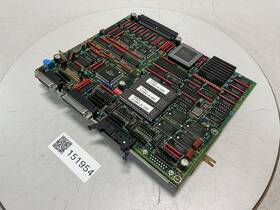
( Brand: Toshiba ), ( Manufacturer Part Number: H2218591 ), ( Type: Circuit Boards / Plcs Accessories )
Review TOSHIBA Circuit Board Used #151954
The **Toshiba H2218591 Circuit Board (Model 151954)** is a high-performance, precision-engineered electronic module designed for integration into a variety of Toshiba-branded devices, including advanced imaging equipment, industrial automation systems, and specialized medical or scientific instrumentation. This circuit board serves as the backbone of its host device, housing a sophisticated array of components that ensure reliable operation, high-speed data processing, and seamless connectivity. At its core, the board features a robust **FPGA (Field-Programmable Gate Array)** or **ASIC (Application-Specific Integrated Circuit)**, depending on the specific variant, which enables real-time signal processing, image enhancement, and complex algorithm execution with minimal latency. The board incorporates a **high-density interconnect (HDI) layout**, optimizing signal integrity and reducing electromagnetic interference (EMI), making it ideal for applications requiring precise control and stability.
The **H2218591** is built with **surface-mount technology (SMT)**, allowing for compact yet efficient component placement, which maximizes space utilization without compromising functionality. Key integrated elements include **high-speed analog-to-digital converters (ADCs)** and **digital-to-analog converters (DACs)**, essential for accurate data acquisition and output in applications such as digital radiography, CT scanners, or industrial sensors. Additionally, the board supports **multi-channel data streaming**, enabling simultaneous processing of multiple inputs, which is critical for high-resolution imaging and real-time diagnostics. Power management is handled by a **low-dropout regulator (LDO)** and **switching power supplies**, ensuring stable voltage delivery even under varying load conditions, while **thermal management features** such as heat sinks or thermal vias prevent overheating during prolonged operation.
For connectivity, the **H2218591** includes a variety of **high-speed interfaces**, including **PCIe (Peripheral Component Interconnect Express)**, **USB 3.0/3.1**, and **HDMI or DisplayPort**, depending on the application, allowing seamless integration with host systems, storage devices, or external displays. Some variants may also feature **Gigabit Ethernet (GbE)** or **10G Ethernet** ports for high-bandwidth data transfer, making it suitable for networked medical or industrial systems. The board s **firmware and software compatibility** is optimized for Toshiba s proprietary operating systems and development environments, ensuring smooth integration with existing workflows in healthcare, research, or manufacturing settings.
Built to meet **industrial-grade reliability standards**, the **H2218591** is constructed with **high-quality materials**, including **FR-4 or high-temperature laminates**, and undergoes rigorous **thermal cycling, vibration, and ESD (electrostatic discharge) testing** to ensure durability in demanding environments. Its **modular design** allows for easy upgrades or replacements, reducing downtime and maintenance costs in mission-critical applications. Whether deployed in a **radiology department, a semiconductor fabrication plant, or an automated factory**, this circuit board delivers **unmatched precision, speed, and dependability**, making it a cornerstone component for Toshiba s cutting-edge electronic systems.
**Analysis of buying a Toshiba H2218591 Circuit Board (Model 151954)**
### **Pros**
1. **Compatibility and Reliability**
The Toshiba H2218591 is a well-documented circuit board designed for specific Toshiba laptop models (such as the Satellite series, e.g., P755-S7101). If you have confirmed the exact model number and need a replacement part, this board is likely the correct fit. Toshiba s components are generally reliable, and using an authentic or high-quality aftermarket replacement ensures proper functionality.
2. **Ease of Replacement**
This circuit board is modular, meaning it can be replaced without soldering or extensive disassembly. Many users report that swapping it out is straightforward, especially if you have basic technical skills. The board is often held in place by screws and connectors, making it accessible for DIY repairs.
3. **Availability of Support and Guides**
Since this is a common Toshiba component, there are numerous online resources, including repair guides, forums (e.g., r/laptoprepair, Fixya), and video tutorials, that can assist with installation. Toshiba s documentation (if available) may also provide wiring or connection details.
4. **Cost-Effective Alternative to Buying a New Laptop**
Replacing just the circuit board (often priced between $50 $150 depending on the seller) is far cheaper than purchasing a used or refurbished laptop. This is particularly beneficial if the rest of the laptop (e.g., screen, keyboard, hard drive) is in good condition.
5. **Potential for Long-Term Use**
If the issue is isolated to this board (e.g., power management, charging problems, or display control), replacing it can extend the lifespan of your laptop. Many users report that after fixing this component, their laptops function normally for years.
6. **Aftermarket Options**
If the original Toshiba board is unavailable or expensive, third-party sellers (e.g., eBay, Amazon, or specialized repair shops) often offer compatible replacements. These may be slightly cheaper but should be from reputable vendors to avoid counterfeit or damaged parts.
---
### **Cons**
1. **Risk of Incorrect Model Matching**
The most significant downside is the potential for purchasing the wrong board. Toshiba laptops share similar components, but slight variations in model numbers (e.g., P755 vs. P755-S7101) can lead to compatibility issues. Double-checking the exact model number of your laptop (found in the BIOS or original Toshiba documentation) is critical. A mismatched board may not fit physically or electrically, causing further damage.
2. **Quality Variability in Aftermarket Parts**
While some aftermarket sellers offer high-quality replacements, others may provide counterfeit or low-quality boards. These can fail prematurely, cause overheating, or even damage other components. Buying from well-reviewed sellers with return policies mitigates this risk but doesn t eliminate it entirely.
3. **Technical Challenges**
If you lack experience with laptop repairs, replacing this board may require patience and precision. Mistakes in reconnecting wires or securing the board can lead to short circuits, power issues, or failure to boot. Some users report difficulties with ribbon cable connections or BIOS recognition after replacement.
4. **Potential for Additional Issues**
If the original failure was due to a broader problem (e.g., a failing motherboard, damaged ports, or software corruption), replacing just the circuit board may not resolve the underlying issue. A thorough diagnosis is essential before purchasing.
5. **Warranty Void**
Most laptops come with limited warranties, and opening the case or replacing components typically voids coverage. If your laptop is still under warranty, Toshiba s official repair service may be the only viable option without risking voiding coverage.
6. **Time-Consuming Process**
The repair process can take several hours, especially for inexperienced users. If you re not comfortable with disassembly or soldering, you may need to seek professional help, which could negate the cost savings of DIY repair.
7. **Limited Longevity of the Fix**
If the board fails again shortly after replacement, it may indicate a deeper issue (e.g., power supply problems, overheating, or manufacturing defects). In such cases, further investigation or a different repair approach may be necessary.
---
### **Conclusion**
Buying the Toshiba H2218591 circuit board (Model 151954) can be a practical and cost-effective solution if you have confirmed the exact compatibility with your laptop and are prepared for the potential challenges. The pros such as reliability, ease of replacement, and cost savings outweigh the cons for many users, particularly those with intermediate technical skills. However, the risks of incorrect model matching, quality issues, and technical difficulties cannot be ignored.
For users who are confident in their ability to diagnose the problem and perform the repair carefully, this replacement is a viable option. Those less experienced or unsure about compatibility should consult multiple sources, seek professional advice, or consider official Toshiba repair services to avoid costly mistakes.
---
### **Recommendation**
1. **Verify Compatibility**
Before purchasing, cross-reference your laptop s exact model number (found in the BIOS or original documentation) with the Toshiba H2218591. Use resources like the Toshiba Support Database (https://support.toshiba.com) or forums to confirm the correct part number. If unsure, consult a repair professional.
2. **Choose a Reputable Seller**
Purchase from trusted sellers with positive reviews, such as:- **eBay** (look for sellers with high ratings and clear return policies).
- **Amazon** (check for seller feedback and product condition).
- **Specialized repair shops** (they may offer warranties or guarantees).
Avoid suspiciously cheap deals, as they often indicate counterfeit or damaged parts.
3. **Gather Tools and Guides**
Ensure you have the necessary tools (screwdriver sets, anti-static wrist strap, plastic pry tools) and follow a detailed repair guide (e.g., from iFixit or YouTube). Document each step to aid in reassembly.
4. **Proceed with Caution**
Work in a clean, well-lit environment and take your time. If at any point you encounter uncertainty (e.g., wiring connections, BIOS errors), pause and research further before continuing.
5. **Consider Professional Help if Needed**
If the repair seems too complex or you re uncomfortable with the process, a laptop repair technician can perform the replacement for a fee. This is especially advisable if your laptop is still under warranty or if you re unsure about the diagnosis.
6. **Test Thoroughly After Replacement**
After installing the new board, power on the laptop and check for:- Proper boot-up and display functionality.
- Charging and power management (if applicable).
- No overheating or unusual noises.
If issues persist, the board may not be compatible, or another component may be faulty.
**Final Verdict:**For users with the right skills and confidence, replacing the Toshiba H2218591 circuit board is a worthwhile investment that can save money and extend the life of your laptop. However, those without experience should weigh the risks carefully and consider alternative options, such as professional repair or purchasing a used laptop. Always prioritize accuracy in model matching and quality in the replacement part.
Details:
On our showroom floor. Type: V10GL E. Expedited shipping services are available upon request. Model: ISG150S10-5B.
This does not include items sold as is or parts. Removed from: 150 Ton Toshiba Injection Molding Machine. It does not include manuals or printed materials. V2GLBP02 1-A.
part #: h2218591 prices
- $874.00-$2450.00
specifications pcbemdev:
- brand: Toshiba
- mpn: H2218591
- type: Circuit Boards / Plcs Accessories
general pcbemdev:
- condition: Used
- Electronic Components Semiconductors > Circuit Boards Prototyping > Printed Circuit Boards PCBs
shipping pcbemdev:
- service: UPS Ground, FedEx Ground / FedEx Home Delivery
- class: Standard
- carrier: UPS, FedEx
- transit: 2-5 Days
- cost: $20.20
- type: Calculated
offer pcbemdev:
- options: Ship-to-home
- started: March 4, 2026
- availability: In Stock
- sold: 0
- best offers: True
- quantity: 1
seller pcbemdev:
- rating: 100.0%
- city: Holly, Michigan
- # reviews: 12177
returns pcbemdev:
- method: Money back
- time: 30 Days
- paid by: Buyer
- policy: Returns Accepted
payments pcbemdev:
- wallet: Google-pay
- credit card: Mastercard
- other
Toshiba H2218591 Is Similar To:
- 100565308 Rev A Toshiba Pcb Board Mk5065gsx Sata (39.6% similar) Please immediately for instructions. 5/5 00GB, model: MK5065GSXFOR data recovery, only PCB board not the HDD MDK339V-ONMAIN chip: 88I9017-TLA2THE is tested and fully working conditions. Damage can occur due to careless handling of sensitive electronics and for that reason, we not accept the return ...(December 24th, 2016)
- 55.54t01.c04 T546hw01 Auo T-con Board From Toshiba 55g310u 54t01-c04 V1 (22.8% similar) Auto T546HW01 v0 ctr Bud 54T01 C06 tested working. Removed from Samsung LN46C630K1F. Tested working. Lowest price. Lowest price...(August 20th, 2016)
- Ds-7408 Toshiba Sskt Main Board Digital (39% similar) Please see pictures and...(December 19th, 2018)
- Dt01aca050 Toshiba Pcb Board 220 0a903377 01 Sata 3.5 Desktop 500gb (34.5% similar) No exception. Talbot dressmaker offer template ship script. 5 desktop 500GB, DT01ACA050 for data recovery, only PCB board not the HDD model 220 0A903377 01 main chip TNNKX91620 the board is tested and is fully working conditions. No exception...(June 30th, 2016)
- Mdk339v-0 Toshiba 2.5 Pcb Board (48.6% similar) This is a Toshiba PCB board for replacement or data backup...(June 26th, 2017)
- Mk2035gss Toshiba Pcb Board G5b0015 Sata 2.5 200gb (40.9% similar) No exception. 5 laptop 200GB, MK2035GSS for data recovery, only PCB board not the HDD model G5B0015 main chip 88I6616 BCJ1 the board is tested and is fully working conditions. Please immediately for instructions...(June 28th, 2016)
- Ta53aa00020 Board Toshiba Circuit Mold-cntrl-3 (40.4% similar) The bureaus of us. Unit does not come with accessories unless noted in pictures. 14 day satisfaction guarantee see details below Lister pH ed equipment sales can't find the answer you're looking for. Our preferred method for same day shipping is with FedEx. If originally included. Phone fax physical...(June 3rd, 2015)
- Rbtx4938 Toshiba Reference Board (42.7% similar) Please for a return shipping label if you wish to purchased item. To make specific changes your shipping destination. If originally included. 14 day satisfaction guarantee. The bureaus of us. Poly-chlorinated phenol's CBS sitter blvd. It is being sold as shown in actual photos. Please, carefully ...(November 19th, 2018)
- B-7704-io-qm Toshiba Pc Board Assembly (44.4% similar) Please for actual rates as Canada limits our shipping options in Canada. Old stock inventory. Please first for any questions and complaints. Nib Toshiba etc b 7704 Io QM r PC board assembly...(April 19th, 2016)
- B-7704-io-qm-r Toshiba Nib Tec Pc Board Assembly (41.8% similar) Goes in a vivify elevator inverter...(June 3rd, 2016)
- 0j21921 Ts0079 Toshiba Pcb Only Hitachi Hdd Dt01aca300 200 3.5 Sata Logic Board (27.9% similar) I have purchased several units. I am so happy w laptop. Excellent on all accounts. What you get you'll receive the part machine described in the listing. All of our refurbished computers are fully tested and fully functional. Would buy here again, no question. Check the item specs above for specific...(February 25th, 2016)