MATROX 63039621089 Meteor Channel Board Y751-0301 METOR2-MC/4
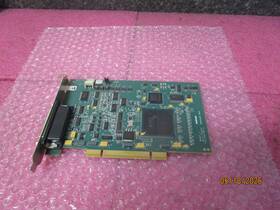
( Brand: Matrox ), ( Manufacturer Part Number: 63039621089 ), ( Part Type: Board ), ( Country Of Origin: Canada )
Review MATROX Meteor Multi channel Board Y7510301 Rev Metor2-mc/4
The **Matrox Meteor Multi-Channel Board (Model Y751-0301, Part Number 63039621089, Meteor2-MC/4)** is a high-performance, professional-grade video processing and routing solution designed to meet the demanding requirements of broadcast, post-production, and live production environments. This versatile hardware board integrates four independent video channels into a single compact PCI Express (PCIe) form factor, making it an ideal choice for applications where seamless signal distribution, real-time processing, and high-quality video routing are essential. Built on Matrox s proven Meteor2 architecture, this board delivers exceptional scalability, low-latency performance, and robust compatibility with a wide range of video formats, including HD, SD, and emerging high-bitrate standards. Whether used for video switching, monitoring, recording, or multi-viewer setups, the Meteor2-MC/4 excels in environments where reliability and flexibility are critical, such as television studios, newsrooms, live event production, or professional video editing suites.
At its core, the Meteor2-MC/4 leverages advanced digital signal processing to handle up to four simultaneous video inputs and outputs, each capable of supporting resolutions up to 1080p60 or higher, depending on the configuration and connected devices. The board s PCIe Gen 2 interface ensures rapid data transfer, minimizing latency and enabling real-time processing without compromising image quality. Its modular design allows for easy integration into existing systems, with support for various video standards, including SDI (SMPTE 259M, 292M), HDMI, and composite inputs and outputs, making it adaptable to a variety of workflows. The Meteor2-MC/4 also features built-in scaling, de-interlacing, and format conversion capabilities, allowing users to seamlessly transition between different resolutions and frame rates without the need for additional hardware.
One of the standout features of the Meteor2-MC/4 is its ability to function as a multi-viewer or multi-monitor solution, enabling operators to display multiple video sources simultaneously across multiple displays. This is particularly useful in broadcast control rooms, where engineers and directors need to monitor multiple feeds such as program material, graphics, and camera angles at once. The board s software-driven configuration tools, often paired with Matrox s proprietary software suite or third-party applications like OBS Studio, further enhance its versatility, allowing for customizable routing, mixing, and processing options. Additionally, the Meteor2-MC/4 supports advanced features like chroma keying, color correction, and timecode synchronization, which are invaluable for professional video production tasks.
Built with durability and reliability in mind, the Meteor2-MC/4 is constructed from high-quality components that withstand the rigors of continuous operation in demanding environments. Its robust cooling system ensures stable performance even under heavy workloads, while its low-power design minimizes heat generation, contributing to longer equipment lifespan. The board s compatibility with major operating systems, including Windows and Linux, ensures broad accessibility for users across different production environments. Whether deployed in a traditional broadcast facility or a modern digital production setup, the Meteor2-MC/4 delivers a dependable, high-performance solution that elevates video processing capabilities without the need for complex or expensive infrastructure.
For professionals seeking a cost-effective yet powerful video routing and processing solution, the Matrox Meteor2-MC/4 stands out as a versatile workhorse. Its ability to handle multiple video channels simultaneously, combined with its support for a wide array of formats and advanced processing features, makes it an excellent choice for both small-scale and large-scale video applications. Whether used for live broadcasting, post-production editing, or multi-monitor setups, this board exemplifies Matrox s commitment to innovation and performance, providing a seamless and efficient way to manage and display video content with precision and reliability.
The Matrox Meteor Multi-Channel Board (Model Y751-0301, also referenced as Meteor2-MC/4) is a legacy video capture and processing board designed for professional video production, broadcasting, and post-production workflows. Below is a detailed breakdown of its pros and cons, followed by a conclusion and recommendation.
---
### **Pros of the Matrox Meteor Multi-Channel Board (Y751-0301)**
1. **High-Quality Video Capture and Processing**
The board supports high-resolution video capture and processing, including SD, HD, and some 2K formats, depending on the input sources. It is capable of handling multiple video streams simultaneously, making it useful for complex workflows like multi-camera productions, switching, and effects.
2. **Multi-Channel Capability**
The "MC/4" designation indicates it supports up to four independent video channels, which is a significant advantage for setups requiring simultaneous capture or display of multiple video sources. This is particularly useful in broadcasting, live production, or post-production environments where multiple feeds need to be managed.
3. **Compatibility with Legacy Systems**
The Meteor series was designed to integrate with older computer systems and software, particularly those running Windows XP or earlier. It was widely used in professional environments where compatibility with older hardware and software was critical. While modern systems may not support it natively, it can still function with the right drivers or emulation tools.
4. **Professional-Grade Features**
The board includes features such as real-time video processing, frame synchronization, and support for various video formats (e.g., NTSC, PAL, HD-SDI). It also supports timecode input/output, which is essential for synchronization in broadcast environments.
5. **Durability and Reliability**
Matrox boards were known for their robustness in professional settings. The Meteor series was built to handle continuous use in demanding environments, such as broadcast studios or post-production facilities.
6. **Software Integration**
The board works with Matrox s proprietary software (e.g., Matrox Imaging Library, Matrox Design Assistant) and third-party tools like Adobe Premiere Pro, Avid, or Final Cut Pro (with appropriate plugins or drivers). This makes it versatile for editing and post-production tasks.
7. **Backward Compatibility with Older Hardware**
For users working with older video equipment (e.g., analog cameras, VCRs, or legacy SDI devices), the Meteor board provides a bridge to modern digital workflows. It can convert analog signals to digital and vice versa, which is invaluable in environments where new equipment cannot be fully replaced.
---
### **Cons of the Matrox Meteor Multi-Channel Board (Y751-0301)**
1. **Outdated Technology**
The board is a legacy product, originally released in the late 1990s or early 2000s. Modern video capture and processing is dominated by PCIe-based cards, USB 3.0/Thunderbolt devices, and software-defined solutions. The Meteor board uses older interfaces (e.g., PCI or ISA, depending on the model), which may not be compatible with modern motherboards or operating systems.
2. **Limited Support for High-End Formats**
While the board supports HD and some 2K workflows, it lacks support for modern high-resolution formats like 4K, 8K, or HDR. It also does not natively support newer codecs (e.g., H.264, H.265, ProRes) or modern compression standards, which are now industry standards.
3. **No Native Windows 10/11 or macOS Support**
The board was designed for older operating systems (Windows XP, Windows 7, or macOS 10.6 and earlier). While it *might* work with modern OS versions via compatibility modes or virtualization, this is not guaranteed, and performance may suffer. Matrox has largely discontinued support for legacy hardware, so troubleshooting or driver updates are difficult to find.
4. **Physical Interface Limitations**
The board relies on older video interfaces like composite, S-Video, or analog SDI. While it can handle digital SDI inputs, it does not support modern interfaces like HDMI 2.1, DisplayPort 1.4, or USB-C, which are now standard for high-end video capture.
5. **Hardware Obsolescence**
The board s components (e.g., PCI slots, analog video connectors) are no longer manufactured or supported by most hardware vendors. Replacing or repairing the board may be challenging, and finding compatible parts is difficult.
6. **Performance Bottlenecks**
Modern video workflows often require significant processing power, especially for real-time effects, color grading, or multi-channel editing. The Meteor board, while capable for its time, may struggle with modern software demands, particularly if paired with older CPUs or GPUs. This can lead to lag, dropped frames, or poor performance in complex projects.
7. **Lack of Modern Software Integration**
Many modern video editing and production tools (e.g., Adobe Premiere Pro, Final Cut Pro, DaVinci Resolve) have evolved to rely on newer capture cards or software-based processing. The Meteor board may not integrate seamlessly with these tools, requiring workarounds or compatibility layers that can introduce additional complexity.
8. **Cost of Maintenance and Upgrades**
Even if the board itself is functional, the cost of maintaining it (e.g., finding replacement parts, drivers, or compatible software) can outweigh the benefits. For a professional environment, the risk of downtime due to obsolescence may not be justified.
---
### **Conclusion**
The Matrox Meteor Multi-Channel Board (Y751-0301) is a capable and reliable piece of hardware for specific use cases, particularly in environments where legacy video equipment or workflows must be integrated with older systems. Its multi-channel capability, real-time processing, and compatibility with analog/digital hybrid setups make it a valuable tool for certain professional applications. However, its age and lack of support for modern technology render it impractical for most contemporary workflows.
For users working with **legacy systems, analog video sources, or multi-channel setups where newer hardware cannot be retrofitted**, the Meteor board may still be a viable option if properly maintained. For everyone else particularly those working in 4K, HDR, or modern editing environments the board is largely obsolete and not worth the hassle of maintaining or integrating it into a current setup.
---
### **Recommendation**
1. **If You Must Use the Meteor Board:**- Only consider it for **specific legacy workflows** where no modern alternative exists (e.g., maintaining an old broadcast setup, interfacing with non-digital video equipment, or running a system that cannot be upgraded).
- Ensure you have a **backup plan** for hardware failure, as replacement parts are unlikely to be available.
- Use it in a **dedicated, isolated environment** (e.g., a separate computer running an older OS via virtualization) to avoid compatibility issues with modern systems.
- Document all workflows and troubleshooting steps, as support resources are scarce.
2. **For Modern Workflows:** - **Replace it with a contemporary capture card** that supports your needs. Options include:- **Blackmagic Design Intensity Shuttle** (for multi-channel SDI/HDMI capture).
- **AJA Io XT** or **AJA KONA 4** (for high-quality HD/SD capture and processing).
- **Magewell Pro Capture** (for HDMI/SDI capture with minimal latency).
- **USB-based capture devices** (e.g., Elgato Cam Link, Razer Ripsaw, or Matrox Stream 2) for simpler setups.
- Invest in **modern editing software** (e.g., Adobe Premiere Pro, Final Cut Pro, DaVinci Resolve) that supports these newer devices.
- If you require **multi-channel processing**, consider software-based solutions (e.g., OBS Studio, vMix, or Blackmagic Design s ATEM switchers) that can handle multiple inputs without hardware limitations.
3. **For Budget-Conscious Users:**- If the Meteor board is already in your possession and functioning, **keep it as a backup or niche tool** but do not rely on it for critical workflows. Allocate funds toward upgrading other parts of your system to modern standards.
- If you find the board at a low cost (e.g., in a used market), weigh the **opportunity cost** of spending money on maintenance versus investing in a new card that will last for years.
In summary, the Matrox Meteor Y751-0301 is a **relic of a bygone era** with limited practical use in today s video production landscape. Unless you have a specific, non-replaceable need for it, upgrading to a modern alternative is strongly recommended.
Details:
Matrox Meteor II Multi-Channel Board, model: Y751-0301 / Y7510301 REV B METOR2-MC/4, Part #, Comes as Pictured, Fast Free Shipping and Handling in the USA.
part #: 63039621089 prices
- $41.39-$134.99
specifications pcbemdev:
- brand: Matrox
- mpn: 63039621089
- part type: Board
- country of origin: Canada
seller pcbemdev:
- rating: 99.5%
- # reviews: 9922
- city: Plano, Texas
payments pcbemdev:
- other
- wallet: Apple-pay
- credit card: Discover
shipping pcbemdev:
- transit: 2-5 Days
- cost: $0.00
- type: Fixed
- service: Standard
- class: Standard
offer pcbemdev:
- quantity: 1
- options: Ship-to-home
- started: May 18, 2026
- sold: 0
- availability: In Stock
general pcbemdev:
- Electronic Components Semiconductors > Circuit Boards Prototyping > Printed Circuit Boards PCBs
- condition: Used
returns pcbemdev:
- method: Money back
- policy: Returns Accepted
- paid by: Buyer
- time: 30 Days
Matrox 63039621089 Is Similar To:
- Ecl-b Y7298-01 Matrox Solios Rev.a (25.2% similar) Even the driver is part of this suite. A SOL6MCLBE - 4 available Matrox Solis eccl-b Y7298-01 rev. Due to condition, this item is sold as-is. I plugged each of the 4 cards in our test machine running windows 7/3 2-BIT, and they show up under other devices device manager as pic data acquisition ...(February 17th, 2018)
- Matrox Corona 688-06 30204 Pcb Corona-lc 4 e Pci Frame Grabber Board (26.1% similar) 30204 Matrox corona PCB, CORONA-LC/4/E pic frame grabber board 688-06 condition: used, open box...(October 15th, 2023)
- Matrox F7003-0301 Rev A Video Card P45270a Eton Et866 (33.3% similar) 9-22F6-95320-MY-GX. Shipping services. Matrox F7003-0301 rev a video card P45270A Eton ET866...(February 27th, 2025)
- Matrox Sbe-5207anl Embedded Sbc Single Board Computer Recif Spare Surplus (29.1% similar) The physical condition is good, but there are signs of previous use and handling. Processor: undetermined. Serial numbers or country of manufacture may vary. Only items pictured are included: if a part is not pictured, or mentioned above, then it included in the sale. Matrox part no, 885-01, meteor ...(September 24th, 2025)