AGILENT TECHNOLOGIES G7000-61018 Control Board Pcb Filament G7000-31018 Driver
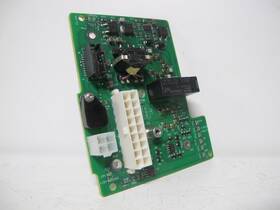
( Brand: Agilent Technologies ), ( Manufacturer Part Number: G7000-61018 ), ( Part Type: Control Board Driver )
Review AGILENT TECHNOLOGIES Control Board Pcb Filament Driver
The **Agilent G7000-61018 / G7000-31018 Control Board PCB Filament Driver** is a high-performance, precision-engineered component designed for integration into Agilent s G7000 series of gas chromatography (GC) systems, specifically the **7890A/7890B GC Systems**. This critical subassembly serves as the central nervous system for filament-based detectors, such as the **FID (Flame Ionization Detector)** and **TCD (Thermal Conductivity Detector)**, ensuring reliable, accurate, and consistent operation under demanding analytical conditions. Crafted with meticulous attention to detail, the control board combines a robust **printed circuit board (PCB)** layout with advanced **digital and analog signal processing circuitry**, enabling seamless communication between the GC s main controller and the detector s filament heating elements. The PCB is constructed using high-grade, thermally stable materials to withstand the rigorous thermal cycling inherent in GC operations, where filament temperatures can fluctuate between ambient conditions and up to **300 C (572 F)** or higher, depending on the application. At its core, the filament driver module incorporates a **high-precision current regulator** capable of delivering stable, low-noise power to the filament while maintaining tight control over temperature fluctuations critical for achieving reproducible chromatographic results. The design incorporates **feedback loops and PID (Proportional-Integral-Derivative) control algorithms** to dynamically adjust power delivery in real time, compensating for variations in filament resistance, ambient temperature, or electrical noise. This ensures optimal filament performance, extending its lifespan and minimizing drift in detector sensitivity. Additionally, the control board features **isolated signal interfaces** to protect against electrical interference, a key consideration in laboratory environments where multiple high-voltage components may coexist. The PCB is also equipped with **diagnostic and fault-monitoring capabilities**, allowing the GC system to self-check for issues such as open circuits, short circuits, or excessive resistance in the filament, thereby enhancing system reliability and reducing downtime. Compatible with Agilent s proprietary software and firmware, this control board integrates seamlessly with the broader GC system architecture, enabling users to configure filament parameters such as heating ramps, stabilization times, and current limits via intuitive graphical interfaces. Whether deployed in routine analytical workflows or high-stakes research applications, the **G7000-61018 / G7000-31018 Control Board PCB Filament Driver** exemplifies Agilent s commitment to precision, durability, and user-centric design, ensuring that chromatographers can achieve consistent, high-quality results with confidence.
### **Pros and Cons of buying a Agilent G7000-61018 / G7000-31018 Control Board (PCB Filament Driver)**
#### **Pros:**1. **Compatibility with Agilent G7000 Series Instruments** These control boards are designed specifically for Agilent s G7000 series of gas chromatographs (GCs), ensuring seamless integration with systems like the 7890A, 7890B, or 7890B GCs. They are not universal replacements but are engineered to work with Agilent s proprietary hardware and software.
2. **Reliability and Durability** Agilent is a well-established manufacturer in analytical instrumentation, known for producing high-quality, long-lasting components. These control boards are built to withstand the demands of laboratory environments, including temperature fluctuations and extended use.
3. **Support for Advanced Features** The PCB filament driver (G7000-31018) is optimized for filament-based injectors (e.g., split/splitless, PTV, or cold on-column), which are critical for precise sample introduction in GC applications. The control board manages power delivery, timing, and safety protocols, ensuring consistent performance.
4. **Compatibility with Agilent Software** The board works with Agilent s ChemStation or OpenLAB software, which are industry-standard platforms for GC operation. This integration simplifies calibration, method development, and data acquisition.
5. **Potential Cost Savings Over New Units** Purchasing a refurbished or used control board (if available) can be significantly cheaper than buying a new one, making it a cost-effective upgrade for older GC systems that still require maintenance.
6. **Easier Troubleshooting and Repairs** Since these boards are designed for Agilent systems, replacement parts, documentation, and technical support are widely available. This reduces downtime and simplifies diagnostic processes compared to third-party or aftermarket components.
7. **Future-Proofing for System Upgrades** If you plan to upgrade other components of your GC (e.g., detectors, columns, or ovens), these control boards remain compatible, allowing for modular upgrades without full system replacement.
---
#### **Cons:**1. **Limited Longevity Compared to New Units** Even if the board is in good condition, it may not last as long as a brand-new component. Agilent s newer models (e.g., 8890 GCs) may use updated electronics that could eventually render older control boards obsolete.
2. **Potential for Compatibility Issues** If the board is sourced from a third-party seller (e.g., eBay, used market), there is a risk of counterfeit or mismatched parts. Always verify authenticity and compatibility with your specific GC model before purchasing.
3. **No Warranty or Limited Support** Used or refurbished boards often come without warranties. If the board fails shortly after purchase, you may be responsible for repair or replacement costs. Agilent s official support may not cover third-party purchases.
4. **Technical Complexity** Replacing or upgrading a control board requires some technical knowledge, especially if it involves soldering, firmware updates, or calibration. Improper installation could damage the GC or void warranties on other components.
5. **Software Dependencies** If the GC s software is outdated or incompatible with the board s firmware, you may need to update or reinstall drivers, which could disrupt workflows temporarily.
6. **Higher Cost Than Basic Replacements** While cheaper than a full GC replacement, these control boards are still specialized components. If your budget is tight, alternative solutions (e.g., repairing existing boards or using third-party drivers) might be considered.
7. **Environmental and Regulatory Considerations** If disposing of an old control board, ensure compliance with electronic waste (e-waste) regulations, as improper disposal can be illegal in many regions.
---
### **Conclusion**
Buying the **Agilent G7000-61018 (control board) and G7000-31018 (PCB filament driver)** can be a **practical and cost-effective solution** if:- Your GC system is an older Agilent model (e.g., 7890 series) that still requires reliable performance.
- You have verified the board s authenticity and compatibility with your specific GC configuration.
- You are prepared to handle any technical challenges during installation or troubleshooting.
- You prioritize long-term reliability over the absolute latest technology.
However, if:- Your GC is outdated and nearing end-of-life, investing in a newer system (e.g., Agilent 8890) may be more future-proof.
- You lack technical expertise to install or troubleshoot the board, consider hiring a certified technician or exploring simpler repair options.
- Budget constraints allow for alternative solutions (e.g., repairing existing components or using compatible third-party drivers).
### **Recommendation**
1. **Verify Compatibility** Confirm that the board matches your exact GC model (e.g., 7890A vs. 7890B) and that it supports your injector type (e.g., split/splitless, PTV). Agilent s documentation or a technician can help with this.
2. **Purchase from a Trusted Source** Buy from **Agilent s official distributors, authorized refurbishers, or reputable lab equipment dealers** to avoid counterfeit or damaged parts. Avoid unverified sellers on general marketplaces.
3. **Consider a Refurbished vs. New Decision**
- If the board is **new or refurbished with warranty**, it may be worth the investment for critical systems.
- If the board is **used without warranty**, weigh the risk against the cost savings. Test it thoroughly after installation.
4. **Budget for Installation and Testing** Factor in labor costs if you re not comfortable installing the board yourself. Calibration and performance checks may also be necessary post-installation.
5. **Explore Alternatives if Needed**
- If the board fails frequently, investigate whether the issue lies with the **injector, power supply, or GC software** before replacing the control board.
- For very old systems, assess whether upgrading to a **newer Agilent GC model** (e.g., 8890) would provide better long-term value.
6. **Document and Backup Data** Before making any hardware changes, ensure critical methods and data are backed up. Test the new board under controlled conditions before full deployment.
### **Final Verdict**
The **Agilent G7000-61018 / G7000-31018 control board** is a **solid choice for maintaining or upgrading an existing Agilent GC system**, provided you prioritize compatibility, source the parts responsibly, and are prepared for potential technical challenges. For users with newer or more complex GC setups, evaluating a full system upgrade may ultimately be more beneficial in the long run.
Details:
Agilent Technologies, Filament Driver III, G7000-61018, G7000-31018, Control Board, Printed Circuit PCBA Technologies.
part #: g700061018 prices
- $85.00-$120.00
specifications pcbemdev:
- brand: Agilent Technologies
- mpn: G7000-61018
- part type: Control Board Driver
offer pcbemdev:
- options: Ship-to-home
- quantity: 1
- started: February 27, 2026
- availability: In Stock
- best offers: True
- sold: 0
shipping pcbemdev:
- class: Standard, One-day, Expedited
- service: UPS Ground, UPS Next Day Air, UPS 2nd Day Air
- transit: 4-7 Days
- type: Calculated
- carrier: UPS
- cost: $10.41
general pcbemdev:
- Electronic Components Semiconductors > Circuit Boards Prototyping > Printed Circuit Boards PCBs
- condition: Used
returns pcbemdev:
- paid by: Buyer
- policy: Returns Accepted
- method: Money back
- time: 30 Days
seller pcbemdev:
- # reviews: 299
- rating: 100.0%
- city: Chattanooga, Tennessee
payments pcbemdev:
- credit card: Mastercard
- wallet: Paypal
- other
Agilent Technologies G7000-61018 Is Similar To:
- Controller Hp Mainframe 01090-66501 Lc Board 1090 Ctl Pcb Agilent (31.3% similar) Standard shipping prices are only good for the lower 48 states. If in doubt, please before purchasing. Dimensions l x w xx 13 x all parts, including accessories and cables are only included if pictured or listed in the. Please by sending a message through or calling. Hp Agilent CT mainframe ...(May 7th, 2015)
- Card Interface Printer Hp 02934-60053 Agilent Board Pcb Rs-232c 293x (25.3% similar) Connection ports are in excellent condition. Cosmetic scuffs scratches from handling. This unit has been used. Standard shipping prices are only good for the lower 48 states. Minimum handling charge is 75 onto a standard pallet and increases for custom pallet's. Soldering side is in excellent ...(May 1st, 2015)
- Detector Start Electron Remote Hp 05971-60009 Agilent Board Apg Pcb Ionization (26.3% similar) Board components are undamaged and in good condition. Please by sending a message through or calling. If in doubt, please before purchasing. Minimum handling charge is 75 onto a standard pallet and increases for custom pallet's. USPS or ups ground. Your satisfaction is extremely important to us. Are...(May 6th, 2015)
- Agilent Card Printed Board Circuit Module Sampler Control Pcb Hp 18824-60100 (30.4% similar) If you do receive the package, submit clear images of the packaging box and damaged item from multiple angles. USPS or ups ground. Board components are in good condition. Cash is only accepted for will calls. Do not lift up on the top plastic sheet or it'll make a mess. Are only included if pictured...(May 1st, 2015)
- Microsal Mainframe 5880a Control Agilent Hp Gc 19321-60010 Pcb Board (30.7% similar) Your satisfaction is extremely important to us. DOA stands for dead on arrival, meaning that the item did not function properly when it arrived. Are only included if pictured or listed in. If you do receive the package, submit clear images of the packaging box and damaged item from multiple angles. ...(May 15th, 2015)
- 69380-60020 Hp Agilent Board Model (25.9% similar) You are purchasing one hp Agilent board model...(April 5th, 2017)
- 05340-60073 Agilent Hp Card Board Assembly (30.6% similar) Thanks in advance. It would be much appreciated. If you think that our offer price is extremely high or too low, please let as know. Shipping all goods are sent in secure packaging. Accept for a few countries...(July 9th, 2016)
- 79880-66528 Agilent 1090 Hplc Circuit Board Hp (32.8% similar) Free shipping in the USA. Cases count against me even if they are resolved. Overview this is a Agilent hp 1090 plc circuit board in excellent condition in the original static bag. I am not overjoyed with what's happening, but I have to roll with it. This listing is for Agilent hp 1090 plc circuit ...(November 18th, 2015)
- 03325-66540 88809f Hewlett Packard Hp Agilent Rev D Pcb Board Plug-in A3 Ref Frac-n Tested (26.7% similar) Pretested board. Have a most wonderful day. I'll ship this unit us. For offer, I have a hp Agilent 88809F rev pcb board plug in a3 ref frack n, tested 100 working perfectly. Pictures accurately show condition. A3 ref frack n A3R1 ref adj A3J1 fan out 10MHZ out A3J3 the unit shown in the pictures is ...(May 13th, 2016)
- 05990-60320 Hewlett Packard Hp Agilent Parallel Remote Pcb A-2808-23 (20% similar) This item is new without the original packaging, inspected by QC department...(December 22nd, 2015)
- 79880-26504 Hp Agilent 1090 Hplc Pcb Board (30.6% similar) This listing is for one hp Agilent pcb board. Items included item as shown in the photos. Functional condition this board is guaranteed to be fully functional. Audio video electronics industrial it computers lab scientific lots. Medical military office radios vehicles other hp Agilent 1090 plc pcb ...(February 24th, 2016)